This Y999 deposit guide walks through the whole process — about two minutes through JazzCash or EasyPaisa. Open the wallet, pick your method, enter the amount, transfer, done. Balance updates almost instantly once the transfer clears.
Three things actually trip Pakistani players up: not finishing the transfer inside the five-minute session window, depositing before checking whether a better first deposit bonus is running, and a name mismatch between the gaming account and the payment wallet. Every method is covered step by step below, along with current limits, deposit timing, and what to do if money doesn’t show up.
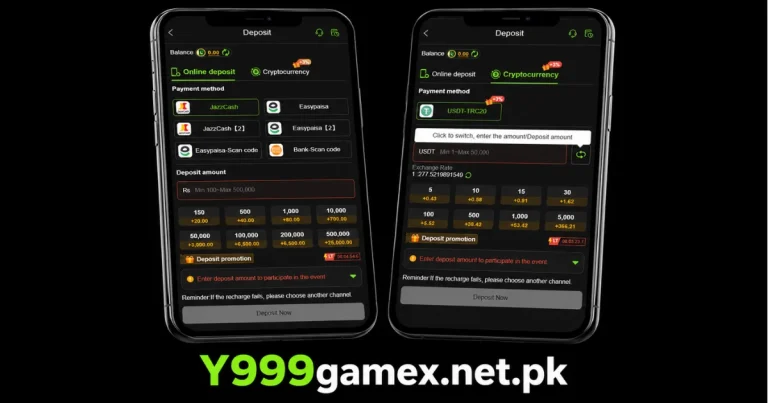
Your Options at a Glance
| Method | Speed | Min Deposit | Best For |
| JazzCash | Instant — seconds | Rs 50 | Fast deposits, most widely used |
| EasyPaisa | Instant — seconds | Rs 50 | Same speed, alternative wallet |
| Bank Transfer | Minutes to hours | Rs 500+ | Larger amounts, no wallet balance needed |
JazzCash and EasyPaisa both credit almost instantly. Bank transfer depends on the bank — usually a few minutes during working hours, slower on weekends and late at night.
Adding Money to Y999 Through JazzCash
The most commonly used method among Pakistani players.
Step by Step
- Open the Y999 app and log in.
- Tap Wallet, then Deposit.
- Select JazzCash as your method.
- Enter the amount — check it meets the Rs 50 minimum.
- The app shows a JazzCash account number and a reference code. You’ve got about five minutes to complete the transfer before this session expires.
- Open JazzCash, go to Send Money, enter the account number, amount, and reference code if there’s a field for it.
- Confirm with your JazzCash PIN.
- Head back to the app — balance should update within a few seconds to a minute.
That five-minute window matters. Take longer and the session closes — you’ll need to start a fresh one, which generates a new account number and reference code. Don’t reuse the old one.
Adding Money to Y999 Through EasyPaisa
Works exactly the same way as JazzCash.
Step by Step
- Log in and go to Wallet, then Deposit.
- Select EasyPaisa.
- Enter the deposit amount.
- The app shows an EasyPaisa account number — same five-minute window applies.
- Open EasyPaisa, go to Send Money, enter the account number, amount and reference code if shown.
- Confirm with your EasyPaisa PIN.
- Check your balance — updates within seconds.
The only real difference between the two is which wallet you already have money sitting in.
Depositing Into Y999 via Bank Transfer
Better suited for larger amounts, or if you’d rather move money straight from a bank account.
Step by Step
- Log in and go to Wallet, then Deposit.
- Select Bank Transfer.
- Enter the amount — the minimum here is typically higher than mobile wallets.
- The app shows bank account details and a reference number.
- Transfer the exact amount through your bank’s app or an ATM, including the reference in the remarks if there’s a field for it.
- Screenshot the confirmation once it goes through.
- Processing usually takes minutes to a few hours. Contact support with your reference number if it hasn’t reflected after three hours.
Use JazzCash or EasyPaisa for regular deposits. Bank transfer for larger, one-off amounts.
How Much You Can Actually Move
| Method | Minimum | Max Per Transaction | Daily Limit |
| JazzCash | Rs 50 | Rs 25,000 | Varies by account level |
| EasyPaisa | Rs 50 | Rs 25,000 | Varies by account level |
| Bank Transfer | Rs 500 | No fixed cap | Bank dependent |
These figures update from time to time — check the app for the current numbers. VIP accounts often carry higher per-transaction and daily limits than standard ones.
The One Habit That Actually Changes Your Starting Balance
Before your very first deposit, open the Promotions section. The first deposit match varies, and the percentage occasionally runs higher during festival periods.
This only applies once — ever. A Rs 1,000 deposit at 100% match gives you Rs 2,000 to play with. The same deposit during a 200% promotion gives Rs 3,000. Deposit on an ordinary day and a better match runs the following week, and that difference is gone permanently — there’s no repeating a first deposit.
Thirty seconds of checking, before you deposit anything, is the single highest-value habit a new player can build.
Keeping Deposits Trouble-Free
Names Need to Match
Your account name should match your JazzCash or EasyPaisa registered name exactly. A mismatch can push a deposit into pending review instead of crediting instantly.
Only Deposit From Your Own Wallet
Using someone else’s JazzCash or EasyPaisa — even with permission — creates a name mismatch that can hold things up. If your own wallet is empty, top it up from your bank account first.
Hold Onto Your Transaction Reference
Every transfer generates a reference number. Screenshot it before leaving the payment app. If a deposit doesn’t reflect, this is what support needs to track it down and credit it manually.
When the Balance Doesn’t Update
Nothing Showing After the Transfer
Wait three minutes first — busy networks cause occasional delays. Refresh the balance screen. Still nothing after five minutes? Check your JazzCash or EasyPaisa app confirms the transfer as Successful. If it went through on the wallet side but the balance hasn’t moved, contact support with the reference number and a screenshot.
Session Expired Mid-Transfer
If five minutes passed before you finished sending, that account number is dead — don’t send money to it. Start a fresh deposit session and use the new details it generates.
Sent the Wrong Amount
Contact support immediately with your transaction reference rather than starting a second deposit to cover the difference — that just complicates the fix.
Checking Your Y999 Deposit History
Every deposit you make is logged in your account automatically. Go to Wallet, then look for Transactions, History or Statement — the exact label depends on which version of the app you’re running. The log shows every deposit with the amount, method used, date, time and current status.
Statuses worth knowing: Pending means the transfer is still being processed on the network side. Completed means the funds have landed and your balance reflects it. Failed means something went wrong with the transfer itself — usually resolved by checking with your JazzCash or EasyPaisa app directly and contacting support if the money left your wallet but never arrived.
Deposit Timing and Why It Matters Beyond the Bonus
Depositing during off-peak hours — early morning or late at night when fewer people are using JazzCash and EasyPaisa simultaneously — sometimes means faster processing on busy days like weekends or right after a PSL match, when transaction volume across the whole network spikes.
This isn’t a hard rule, and most deposits go through instantly regardless of timing. But if you’ve noticed a deposit taking longer than the usual few seconds during a high-traffic period, that’s often the reason rather than anything wrong with your account or the platform itself.
CONCLUSION
This Y999 deposit guide comes down to a simple routine: JazzCash and EasyPaisa update within seconds of a successful transfer. Check Promotions before your first deposit, finish transfers inside the five-minute window, deposit only from an account in your own name, and hang onto the reference number from every transfer.